How the app is organized
Five ideas. Once they land, nothing in the app is surprising.
Five phases
Every trip gets all five, automatically, from the moment you create it.
| Phase | Its full name in the app | What lives there |
|---|---|---|
| Prep | Prep: 3+ Days Out | Errands and to-dos with lead time — refill a prescription, submit a mail hold, buy the adapter |
| Pack | Pack: Day Before | The actual packing. Clothes, toiletries, tech |
| Travel | Travel: Day Of | Double Check, what's in your pockets, the last sweep of the house |
| Plans | Plans: While Visiting | Activities, notes to yourself, what you're wearing which day |
| Return | Return: Coming Home | Unpacking, laundry, and what you'd change next time |
The point of splitting them is that each list is only as long as today's job. A hundred-item trip is unbearable; twelve things to do on Tuesday is not.
Four tabs, five phases
The tab bar carries four named phases plus the round + button. That's the most iOS will show without spilling the rest into an overflow menu.
So Prep and Return trade places. Up to your arrival home you see Prep, Pack, Travel, Plans. The day after your return date, Prep steps out and Return steps in.
Nothing is ever unreachable: ••• → Phases lists all five, and picking a hidden one swaps it back for the rest of your visit.
Sections, groups, items
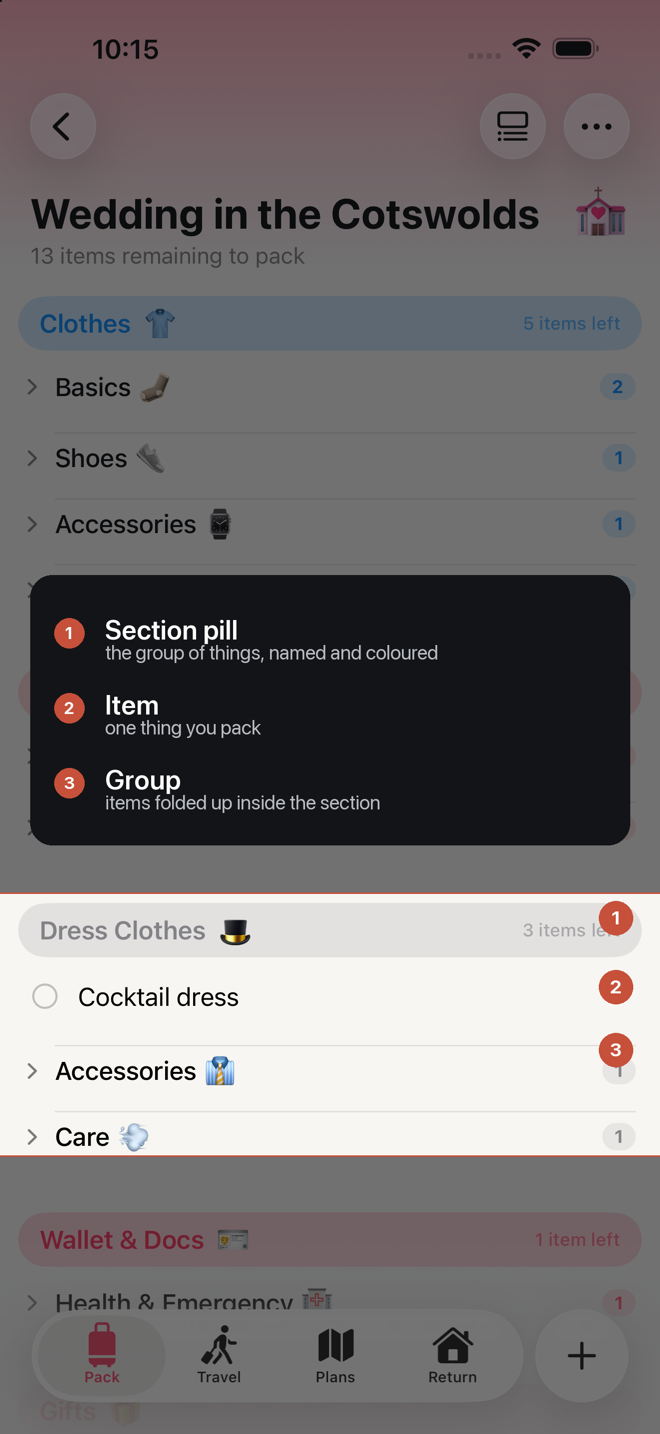
Sections are the colored pills — Clothes, Toiletries, Wallet & Docs. A section belongs to a phase.
Groups are the plain rows with a chevron inside a section — Tops, Bottoms, Shoes. They start collapsed, which is the single most important thing the app does for a crowded screen: Clothes is sixty-one garments in eight groups, and collapsed it's eight rows.
Items are the things themselves, and they come in four flavors:
| Type | What it means | Shows a quantity? |
|---|---|---|
| Item | A physical object you put in a bag | Yes |
| To-Do | Something to do | No |
| Errand | Something to do that involves leaving the house | No |
| Note | A line of text, no action | No |
New entries default to the type that suits the phase: Item on Pack and Travel, To-Do on Prep, Plans and Return.
The library and the trip
This is the rule that explains the most confusing thing about the app, so it's worth thirty seconds.
Your library is a cookbook. It holds definitions: what "T-shirt" is, how many to bring per day, which section it lives in, whether it's critical.
A trip is a meal you cooked from it. When you make a trip, the app copies what it needs out of the library and into the trip. From that moment the trip is self-contained.
Which means:
- Editing a library item does not change trips that already exist. Rename "T-shirt" to "Tee" and last week's trip still says T-shirt.
- Deleting a library item does not damage existing trips. They keep their copy. Nothing breaks, nothing disappears, nothing crashes.
- Templates are the exception. A template holds your library items rather than copies of them, so deleting one takes it out of every template that used it. The warning counts them first.
- Editing an item inside a trip does not change your library. Adjust a quantity for this trip and the library's default is untouched.
- Library changes show up in the next trip you make.
If you want a change to apply everywhere from now on, make it in the library. If you want it to apply to what you're packing tonight, make it on the trip.
The same rule governs templates: a template feeds new trips and never reaches back into old ones.
Sections versus kits
Both are lists of things. The difference is what happens when the same item is in two of them.
Sections share. Your driver's license in Wallet & Docs and in On You is one license in two places. Each row shows "Also in …", checking one checks the other, editing one edits both.
Kits don't. Sunscreen in your Beach Kit and sunscreen in your Hiking Kit are two bottles. They tick independently, because a kit is a physical bag that either has its own sunscreen in it or doesn't.
Pick accordingly when you make your own: section for "this thing, filed under here", kit for "a bag I grab as a unit". See Sections and kits.
Where everything lives
| You want to change… | Go to |
|---|---|
| Tonight's packing | The trip itself |
| Which sections a trip starts with | The trip's tags, or a template |
| What an item means everywhere, forever | Settings → Item Library |
| What a section contains by default | Settings → Sections & Kits Library |
| A whole reusable trip setup | Settings → Template Library (or Home → templates button) |
| How the app looks and behaves | Settings |
What's not here
- No notifications. Nothing will remind you. Not a design oversight — there is no notification code in the app at all.
- No sync between devices. Your data is on this iPhone, included in its iCloud backup.
- No sharing or collaboration.
- Plans doesn't count toward anything. Ticking things there is for your satisfaction; it never affects a progress count or trip completion. See The Plans phase.
More in Guide