Packing day
You're at the bag. Here's what every gesture does.
The gestures
| You do this | You get |
|---|---|
| Tap the circle | Checks the item off |
| Tap the ×3 badge | Edit just the number, in place |
| Swipe one way | Delete (no confirmation) |
| Swipe the other way | Mark Critical and Edit |
| Press and hold | Menu: Change Quantity · Edit · Mark Critical · Mark Charged · Delete Item |
| Drag the + button | Drops a new item exactly where you let go |
| Tap a group's row | Collapse or expand it |
| Press and hold a group's row | Rename Group |
| Swipe a group's row | Delete All or Ungroup |
Swipe direction is yours. Settings → Look & Feel → Swipe to Delete puts delete on the left or the right. Everything else follows.
Rows don't reorder. A packing list's order comes from your library, and dragging a row does nothing. What you can drag is the + button — press it and move, and you drop the new item exactly where you want it instead of at the top of the section.
What happens when you check something off
The row shows its tick and strikethrough for about a second, then slides away — because Hide Completed is the default. That pause is deliberate: it's long enough to see you got the right one, short enough to keep the list shrinking.
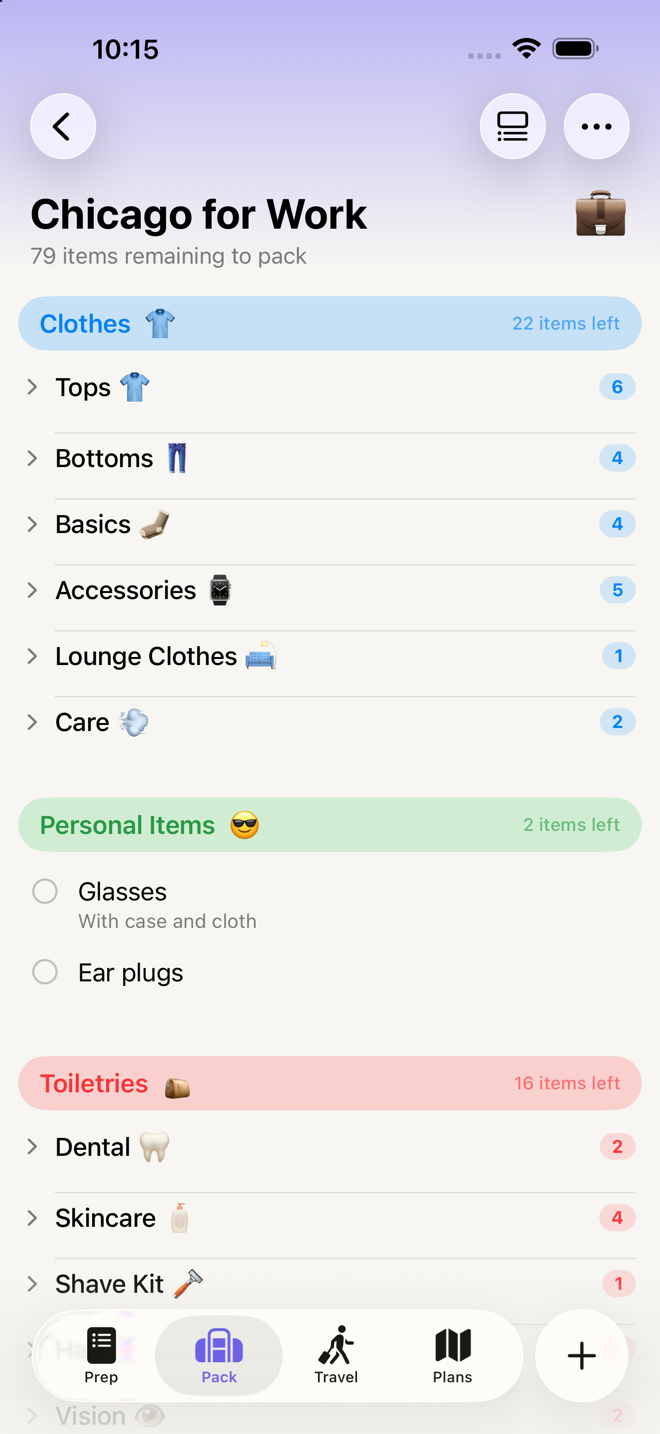
Section pills count down as you go — "7 items left" becomes "6 items left", then "✓ Complete!".
A phase-wide count appears under the title once you're underway: "24 items remaining to pack". It's hidden before you've checked anything and hidden again when you're done, so it only shows while there's something to measure.
When everything in the phase is checked, you get a completion notice instead of an empty screen.
Want to see your progress instead of watching it vanish? ••• → Show Completed. Checked items stay put, struck through, and collect under a COMPLETED heading at the bottom of each section.
The same thing in two places
Your driver's license is in Wallet & Docs and in On You. That's not a bug and it's not a duplicate — it's the same object appearing in the two lists where you'd look for it.
Each copy carries a small line above the name: Also in On You. And because they're linked:
- Checking one checks the other. You can't accidentally pack it twice.
- Marking one as charged marks the other.
- Editing one edits both.
- Deleting one deletes only that copy — the other stays.
Items that came from kits deliberately don't link. Sunscreen in your Beach Kit and sunscreen in your Hiking Kit are two separate bottles as far as the app is concerned, and you tick them separately.
Go deeper
Flag the things that would ruin the trip. Swipe right (or hold → Mark Critical) on your passport, your medication, the charger for the thing that can't be replaced. Critical items get a red marker — and every one of them is gathered automatically into the Double Check panel on the Travel tab for one final pass before you leave. See Travel day and the Double Check.
Filter to just what needs charging. ••• → Filter → Needs Charged the night before, then work that short list. Marking something charged also marks its linked copies.
Reorder to match your actual route. Drag sections in Manage Sections, and items within a section directly on the list, so the order matches how you physically move through your home. The app doesn't know your layout; you do.
Group things yourself. Press and hold a group heading to rename it. Group names get word capitals as you type, the way section, kit and template names do. Two groups can share a name if that's genuinely what you want.
If something looks wrong
I checked the wrong thing and it disappeared. ••• → Show Completed to bring checked items back into view, find it, uncheck it, then turn Show Completed off again. There's no undo.
A whole section vanished when I checked its last item. It moved into the COMPLETED SECTIONS row at the bottom. Tap that to see it. Nothing was deleted.
The list moved under my finger. Checking the last item in a section makes the section collapse away, which reflows everything below. If this keeps catching you out, turn on Show Completed — nothing moves then.
I can't drag an item into a different section. That's a deliberate limit — drags are clamped to the section they start in, and you'll see the "no drop" badge if you wander out. Open the item's editor and change its Section there instead.
A clothing row says worn 3 times under its name. That garment is in three of the outfits you planned on the Plans tab. It's still one thing to pack — packing it once covers all three days. See Planning outfits.
More in Guide