Quantity formulas
Stop counting socks.
The eight rules
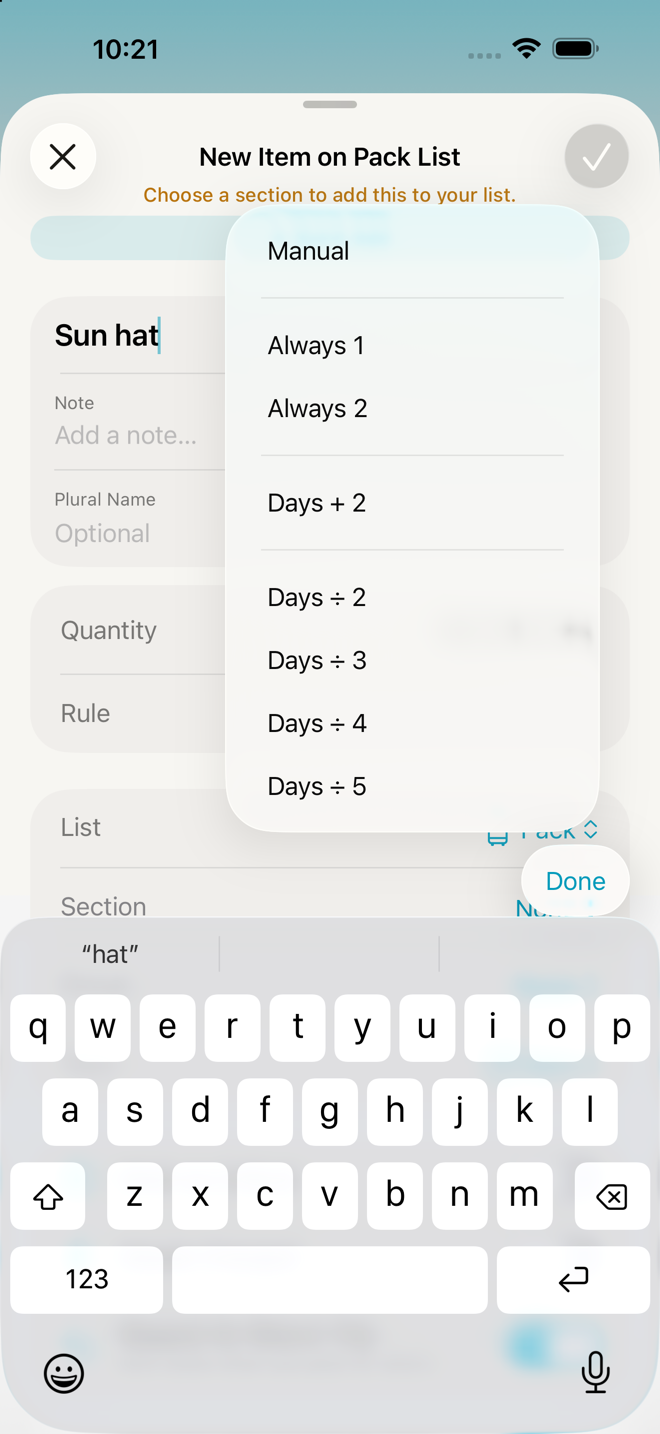
| Rule | Math | On a 2-night trip | On a 5-night trip | On a 14-night trip |
|---|---|---|---|---|
| Always 1 | 1 | 1 | 1 | 1 |
| Always 2 | 2 | 2 | 2 | 2 |
| Always Custom | your number | your number | your number | your number |
| Days + 2 | nights + 2 | 4 | 7 | 16 |
| Days ÷ 2 | at least 2 | 2 | 3 | 7 |
| Days ÷ 3 | rounded up | 1 | 2 | 5 |
| Days ÷ 4 | rounded up | 1 | 2 | 4 |
| Days ÷ 5 | rounded up | 1 | 1 | 3 |
"Days" means nights away — the gap between your departure and return dates. Every division rounds up, and Days ÷ 2 never answers fewer than two, so even an overnight gets you a spare. The deeper fractions carry no floor on purpose: one pair of jeans really is enough for a weekend.
What the library actually does with them
Worth knowing, because it explains why most items just say 1:
| Rule | Used by | Why |
|---|---|---|
| Days + 2 | Underwear, socks, onesies | The things you want spares of. Two extra covers a spill and a delay |
| Days ÷ 2 | T-shirts, tank tops, camis, undershirts, polos | Worn against the skin, so roughly every other day — minimum two |
| Days ÷ 3 | Blouses, button-front shirts, long-sleeve shirts, dresses | Re-wearable, but not indefinitely |
| Days ÷ 4 | Jeans, trousers, shorts, skirts, leggings, bras, ties | Nobody needs seven pairs of jeans for a week |
| Days ÷ 5 | Sweaters and sweatshirts | The outer layer you re-wear most |
| Always 2 | A handful of specifics | |
| Always 1 | Everything else — the large majority of them | A hairbrush is a hairbrush |
So the formulas are doing their work almost entirely inside Clothes, which is exactly where counting is annoying and where over-packing happens.
Setting one
Settings → Item Library → the item → Default Quantity. Pick a rule; choose Always Custom and a stepper appears for your own number.
Per kit, you can override the default: Sections & Kits Library → Browse Kits → the kit → the item. The same item can be ×1 in one kit and ×2 in another, and the override lives on the kit, so it doesn't leak. A customized entry shows "Customized for [kit name]".
On a trip, you just set a number
There is no formula picker inside a trip — and that's deliberate. Once the trip exists, the math has already happened; what you want at that point is "make it four".
- Tap the ×3 badge on a row to edit the number in place.
- Press and hold → Change Quantity, or open the editor and use the stepper.
Setting a number by hand replaces the calculated one for that trip only. Your library rule is untouched.
Go deeper
Templates and length. A template has a nominal length in nights. When you make a trip from it, quantities are worked out against your trip's dates, not the template's — so the same template gives you three shirts for a weekend and seven for two weeks. The template's own number matters only when nothing else is available to count against.
Changing dates recounts — after asking. Quantities are worked out when the trip is created and stored on the trip. If you move your dates afterwards, the app recalculates the per-day ones and shows you what it intends to change before it changes anything.
Three kinds of row it never touches:
- Numbers you set by hand — anything you typed, and anything on Always Custom.
- Items you added yourself.
- Rows the same change is removing — moving your dates can also change which items belong.
The alert tells you how many quantities are changing; tap Review Updates to see which ones. A real date edit can produce twenty-odd changes, which is why it counts rather than listing them.
This is newer behavior. Before it existed, stretching a weekend into two weeks added the longer trip's items but left every quantity at the weekend's figure, silently — an under-pack, which is the exact thing this app exists to prevent.
Plural names come along for the ride. The library stores both "Sock" and "Socks" so a calculated quantity reads properly.
If something looks wrong
Everything says 1. That's the library default and it's correct for most objects. Only clothing ships with per-day rules. If you want more things counted per-day, set their rules in the Item Library.
My quantities changed when I moved the dates. That's intended, and the app asked before doing it. Anything you'd set by hand was left exactly as you left it.
Some quantities changed and others didn't. The ones that moved are on a per-day rule. The ones that didn't are either fixed (Always 1, Always 2), set by hand, or rows you added yourself.
My item shows no number at all. Only Items display a quantity. To-Dos, Errands and Notes never show one, even if a number was stored. Prep, Plans and Return create new entries as To-Dos by default, which is the usual reason a typed "3 chargers" shows no 3.
A weekend trip gave me two T-shirts when the math says one. The round-up rule has a floor of two. That's intentional.
I set a quantity on the trip and my library changed too. It didn't — check the library and you'll find the original rule intact. Trip edits never write back.
More in Guide