Templates
Stop rebuilding the same list.
Making one
From a trip you've just finished (the easy one)
••• → Save as Template, name it, save. From an active trip you stay where you are; from a past trip you're dropped into the editor to tidy it up. It's one screen: any custom sections you made on the trip join your Section Library as part of the save, and if one of their names is already taken you settle it right there without leaving the sheet. See Do it again next time.
This is the best template you'll ever get, because it's a record of what you actually took rather than what you imagined you'd take.
From scratch
Template Library → +. Three steps: details (name, emoji, color, nominal length, and the trip tags this template implies), then a section picker, then the full editor.
Nothing is saved until you tap Save at the end — backing out discards it, with a warning first.
The one that came with the app
Joan Didion's List ✒️ ships archived, so look under Archived Templates. The app describes it as:
From 'The White Album,' 1979. Kept taped inside her closet door during her reporting years. Nothing has been modernized.
Two sections. To Pack and Wear 👗 — 2 skirts, 2 jerseys or leotards, a pullover sweater, 2 pair shoes, stockings, bra, "nightgown, robe, slippers", cigarettes, bourbon, and a toiletries group. To Carry 💼 — mohair throw, typewriter, 2 legal pads and pens, files, house key.
Her phrasing is preserved exactly. It's there as a small argument: a packing list is allowed to be twenty-five lines and still be complete.
Editing one
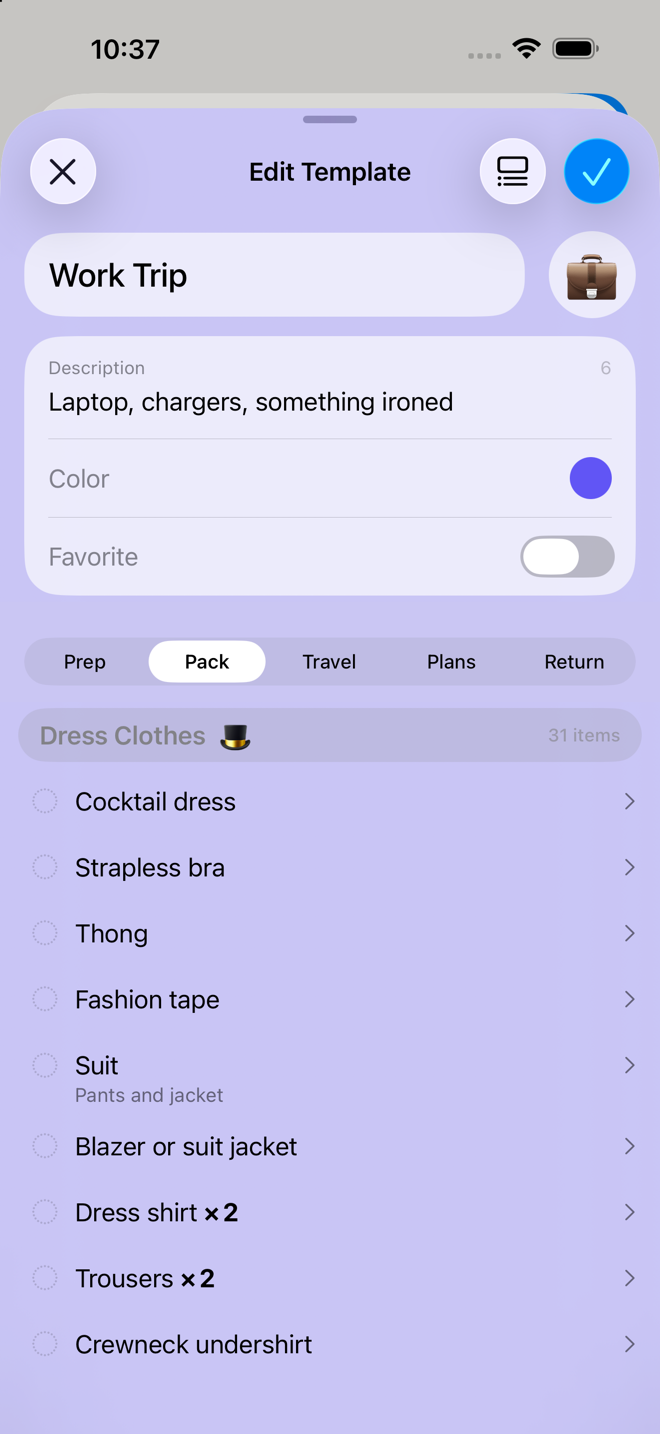
The template editor is segmented by phase — Prep List · Pack List · Travel List · Return List — and works much like a packing list:
- Add sections: the section manager, per phase
- Add items: search your library with an autocomplete, or create one that exists only here
- Reorder: drag rows; a dedicated reorder sheet handles bigger rearrangements
- Edit an item: name, note, quantity, phase, group, type, charging, critical
- Give the template a description so future-you knows what it's for
Items marked "Custom for this template" are ones with no library equivalent — either you invented them, or you've overridden something enough that it no longer matches. Press and hold one and choose Add to Item Library to promote it into your real library.
Using one
Home → templates button → pick one → name and dates → Create.
There's no section-picking step: the template already decided. The new trip also inherits the template's tags — type, weather, transport, season — so it starts out knowing what kind of trip it is.
Favorites get pinned to that Home menu. Tap the heart in the Template Library, and use Favorites ♥ → Reorder to control their order. The app describes this precisely: "Reorder to set how your favorites appear in the Templates menu on your app's home screen."
You can also start a trip from inside the library: open a template → Start New Trip.
What a template carries
| Carried | Not carried |
|---|---|
| Sections, including custom ones you invented | Dates |
| Items, including custom ones | Trip name |
| Quantities, notes, renamed items and sections | Destination |
| Critical flags, charging settings | Check state — nothing arrives ticked |
| "Needed on the way home" settings | Anything on the Plans phase |
| Trip tags: type, weather, transport, season | Outfits you planned on Plans |
Plans is the one real gap. Activities, notes to yourself and the outfits you planned are specific to one trip's dates and don't survive into a template. If your itinerary repeats, keep it in a Notes to Self section on the trip and copy the trip instead.
Go deeper
Templates versus copying a trip. Both give you a fully-populated starting point.
- Copy as New Trip (Past Trips → hold → Copy as New Trip) is exact and needs no upkeep. Best for "the same trip again".
- A template is a deliberate, tidied-up starting point you maintain. Best for a kind of trip you take often in variations.
Archive rather than delete. Hold a template → Archive Template. It leaves the main list and sits under Archived Templates, recoverable any time.
Nominal length matters more than it looks. A template's stated number of nights is what per-day quantity rules are worked out against when you're not overriding them. Set it to the length of trip you usually take. See Quantity formulas.
Clothes come through as clothes, not as outfits. A template carries the garments themselves — including specific ones you named while planning an outfit — but not the outfits they were arranged into, which belonged to that trip's days. See Planning outfits.
A template holds your real library items, not copies of them. It isn't a second item library. What a template stores is how that template wants each item, and it can change five things and no others:
| Per template | |
|---|---|
| Note | A note just for this template |
| Quantity | Its own rule, or a fixed count |
| Critical | Critical here without being critical everywhere |
| Charge reminder | |
| Repack for return |
Plus which section and group the row sits in. A row you've changed is marked Modified for this template. Everything else about an item — its name, its type — belongs to the item itself, and is edited from the Item Library or the Sections & Kits Library, never from inside a template.
Typing a new item into a template adds it to your library. It's staged while you work: saving the template with ✓ keeps the new items in your Item Library, and closing with ✕ removes them again, after telling you first.
Nothing from the Plans tab travels with a template. Not the outfits, not your activities, not your notes to self — those belong to one trip and stay with it. Copying a trip is different: a copy can bring its outfits along if you ask it to.
If something looks wrong
I edited a template and my current trip didn't change. Correct and deliberate. Templates feed new trips; existing trips are self-contained snapshots. See How the app is organized.
My template has sections I didn't pick. Templates built from scratch always include the core sections — the ones every trip gets. Remove them in the editor if you don't want them.
An item says "Custom for this template" and I didn't customize it. It has no library equivalent, which is also what that label means. Either it was invented here, or the library item it came from has since been deleted.
A trip from my template has different quantities than the template shows. Quantities are worked out against your trip's length when the trip is created, not the template's. A five-day trip and a weekend get different numbers from the same template.
The Template Library is empty. It says so — "Save a trip as a template to reuse your packing setup." Joan Didion's List should still be there; if it isn't, check Archived Templates.
More in Guide