The Plans phase
The one tab that isn't a checklist.
Why it doesn't count
Every other phase burns down: a hundred items, then eighty, then zero. Plans doesn't, and it's deliberate — an itinerary isn't work to finish. So:
- Plans items never appear in "24 items remaining to pack"
- Plans never affects whether a trip reads as complete
- The app never auto-opens the Plans tab
The checkboxes on Activities are there for your own satisfaction. Nothing reads them.
Activities
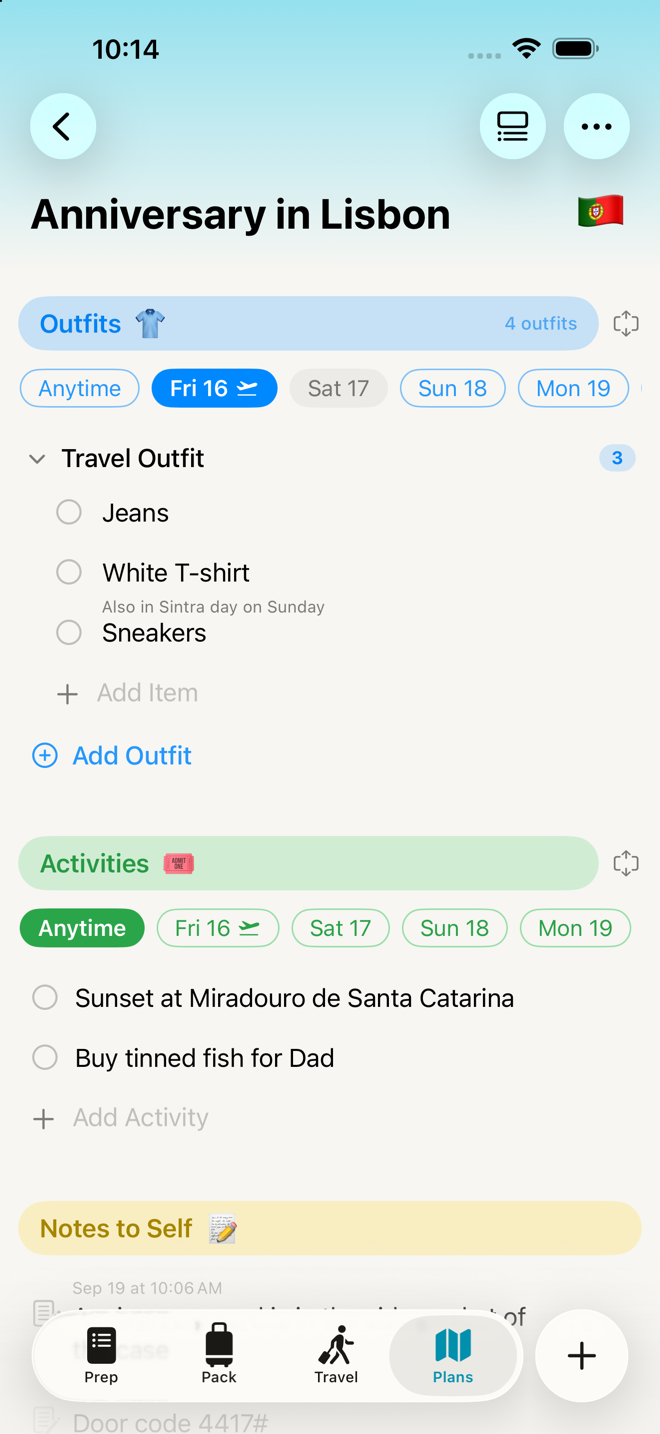
A checklist section for what you're actually doing. Rows carry ticks.
Day pills run across the top:
- Anytime comes first, and is home to anything undated — plus anything whose day the trip no longer covers, so nothing silently disappears when you change your dates.
- Then one pill per day of the trip, with plane markers on the departure and arrival days.
Two ways to look at it, switched with the control beside the section name:
- Compact — one day at a time. While the trip is underway it opens on today; otherwise Anytime.
- Expanded — every day at once, as collapsible groups.
Your choice is remembered for that trip.
Adding an activity while a day is selected files it under that day. Add it under Anytime and it stays undated. The add row says "Add activity…" so you know which kind of section you're in.
Notes to Self
A plain list. No checkboxes, because a note isn't a task.
Each note carries a small timestamp above it — "Aug 14 at 10:37 PM" — recording when you wrote it. It's automatic, it stays visible while you edit, and it's not a date you can assign.
Notes wrap properly across as many lines as you need. Return inserts a new line; tap away to save.
This is the right place for "the hotel's back entrance closes at 11", "Ana's flight lands at 6", or "do NOT check the camera bag".
Outfits
Where you decide what you're wearing. Every trip has this block — there's nothing to turn on.
Tap Add Outfit, name it, add garments, confirm. Each garment lands on your packing list under its type — Tops, Bottoms, Shoes — rather than under the outfit, because that's how a closet is arranged. Canceling the sheet writes nothing at all.
- Anytime comes first in the day rail, for garments you're bringing without tying them to a day.
- Compact shows one outfit at a time, with day pills. Expanded shows all of them.
- The tick under a garment means "I've worn this" — not packed. It's a separate mark that never touches your packing list, and the badge on the block counts what's still unworn.
- A worn garment stays visible, struck through, so an outfit doesn't empty out as you go.
- A garment in two outfits is still one row to pack, reading worn 2 times.
See Planning outfits for the whole thing, including what happens to the generic counts on your packing list.
Working with rows
Plans rows behave like rows everywhere else in the app:
| You do this | You get |
|---|---|
| Single tap | Nothing — no accidental edits |
| Double-tap | Edit in place |
| Press and hold | Menu: Edit · Delete |
| Swipe | Delete (a note or activity) or Remove (a garment from an outfit) |
| Press and hold an outfit heading | Rename Outfit · Delete Outfit |
| Press and hold a garment | Edit Item · Remove from Outfit · Delete from Trip |
| Tap the + button | Opens the add row for the topmost section on screen |
Removing a garment from its only outfit asks what you actually meant:
You've removed [item] from all outfits. Do you still want to bring [item] on your trip?
Keep on Packing List leaves it exactly where it is, in its type group. Delete from Trip removes it. Cancel puts it back in the outfit.
Go deeper
Hide Completed works differently here. The same ••• → Hide Completed covers both ticked activities and outfit days that have already passed, so as the trip proceeds the tab keeps showing you the part that's still ahead.
An outfit's day is its position, not its name. You can rename "Monday's Outfit" to "Beach Day" and it stays the first day of the trip.
Adding your own Plans sections. The Add Section row at the foot of the list. There's no Manage Sections button on this tab, on purpose: none of the packing library's sections has any business having a Plans row.
Plans doesn't survive into a template. Activities, notes and the outfits you arranged belong to one trip's dates. The garments themselves are ordinary packing-list items and do carry through. If your itinerary repeats, copy the whole trip instead (Past trips).
If something looks wrong
My activity vanished when I changed the trip dates. It moved to Anytime, which is where rows land when their day is no longer part of the trip.
Ticking things here isn't moving my progress. Correct, and deliberate.
I can't find Manage Sections. It isn't on this tab. Use Add Section at the bottom.
The + button opened an add row, not a new section. That's right — the + means "add an item" everywhere in the app, including here.
My outfit disappeared from Plans. Its day has passed and Hide Completed is on. Turn it off from the ••• menu.
I removed a garment from an outfit and it's still on my packing list. You answered Keep on Packing List. It stays in its type group — Tops, Bottoms, Shoes — exactly where it already was.
My outfits didn't come through when I made a trip from a template. They don't. The garments do, as ordinary clothing items; the outfits they were arranged into belonged to that trip's days.
More in Guide